VMWare Workstation 15 REST API – Control power state for multiple machines via Python

Or..How to easily power up/suspend your entire K8s cluster at once in VMWare Workstation 15

In VMWare Workstation 15, VMWare introduced the REST API, which allows all sorts of automation.  I was playing around with it, and wrote a quick Python script to fire up (or suspend) a bunch of machines that I listed in an array up top in the initialization section. In this case, I want to control the state of a 4-node Kubernetes cluster, as it was just annoying me to click on the play/suspend 4 times (I have other associated virtual machines as well, which only added to the annoyance.)

Your REST API exe (vmrest.exe) MUST be running if you’re going to try this. If you haven’t set that up yet, stop here and follow these instructions You’ll notice that Vmrest.exe normally runs as an interactive user mode application, but I’ve now set up the executable to run as a service on my Windows 10 machine using NSSM, I’ll have a separate blog entry to show how that’s done.

Some notes on the script:

  • Script Variables – ip/host:port (you need the port, as vmrest.exe gives you an ephemeral port number to hit), machine list, and authCode
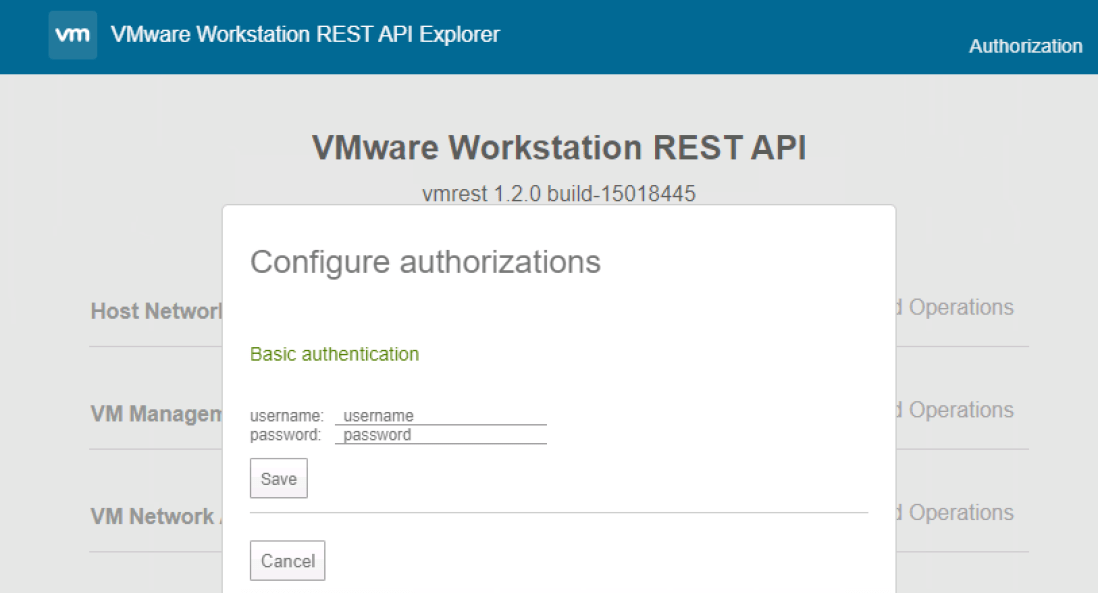
  • Regarding the authCode.  WITH vmrest.exe running, go to “https://ip_of_vmw:port” to get the REST API explorer page (shown below). Click “authorization” up top, and you’ll get to log in. Use the credentials you used to set up the VMW Rest API via these instructions

Screen Shot 2019-12-24 at 3.05.04 PM.png

Then do a “Try it out!” on any GET method that doesn’t require variables and your Auth Code will appear in the Curl section in the “Authorization” header. Grab that code, you’ll use it going forward.

curl.png

Here’s the script, with relatively obvious documentation. Since more than likely your SSL for the vmrest.exe API server will use a self-signed, untrusted certificate, you’re probably going to need to ignore any SSL errors that will occur. That’s what the “InsecureRequestWarning” stuff is all about, we disable the warnings.  My understanding is that the disabled state is reset with every request made, so we need to re-disable it before every REST call.

I’ve posted this code on GitHub HERE.

#!/usr/bin/env python3
import requests
import urllib3
import sys
from urllib3.exceptions import InsecureRequestWarning

'''Variable Initiation'''

ip_addr = 'your-ip-or-hostname:Port' #change ip:port to what VMW REST API is showing
machine_list = ['k8s-master','k8s-worker1','k8s-worker2','k8s-worker3']
authCode = 'yourAuthCode'

'''Section to handle the script arg'''

acceptable_actions = ['on', 'off', 'shutdown', 'suspend', 'pause', 'unpause']

try:

    sys.argv[1]

except NameError:

        action = "on"

else:

    if sys.argv[1] in acceptable_actions:

        action = sys.argv[1]

    else:

        print("ERROR: Action must be: on, off, shutdown, suspend, pause, or unpause")

        exit()


'''Section to get the list of all VM's '''

urllib3.disable_warnings(category=InsecureRequestWarning)

resp = requests.get(url='https://' + ip_addr + '/api/vms', headers={'Accept': 'application/vnd.vmware.vmw.rest-v1+json', 'Authorization': 'Basic ' + authCode}, verify=False)

if resp.status_code != 200:

    #something fell down

    print("Status Code " + resp.status_code + ": Something bad happened")

result_json = resp.json()


'''Go through entire list and if the VM is in the machine_list, if so,
 act! '''

for todo_item in resp.json():

    current_id = todo_item['id']

    current_path = todo_item['path']

    for machine in machine_list:

        if current_path.find(machine) > -1:

        print(machine + ': ' + current_id)

        urllib3.disable_warnings(category=InsecureRequestWarning)

        current_url = 'https://' + ip_addr + '/api/vms/' + current_id + '/power'

        resp = requests.put(current_url, data=action, headers={'Content-Type': 'application/vnd.vmware.vmw.rest-v1+json', 'Accept': 'application/vnd.vmware.vmw.rest-v1+json', 'Authorization': 'Basic ' + authCode}, verify=False)

        print(resp.text)

        '''Better exception handling should be written here of course. 


**12/27/19 NOTE!** – I’ve noticed what I believe to be a bug in VMW 15.5 where if you control power state via the REST API, you lose the ability to control the VM via the built-in VMWare console in the app.  The VMs behave fine (assuming everything else is working), but for some reason the VMW app doesn’t attach the console process correctly.  If you want to follow this issue I’ve submitted to the community here.

3 thoughts on “VMWare Workstation 15 REST API – Control power state for multiple machines via Python

  1. .gist table { margin-bottom: 0; } Summary UPDATE: Ideal VMWare Workstation backup solution WARNING: this script will completely poweroff of vms, If you want to suspend and copy the vms instead, modify the ‘svc*_maps’ variables feel free to use and modify these codes at your own risk Currently working with python 3.9.2 First customize your variables in Template.py Second Install as shown below. Third Enjoy automated backups. TODO: Look for a similar solution to RSYNC using some kind of python RSYNC-like behavior for vm files that don’t need to be copied over again. example: if a vm has been powered off for weeks, we should not copy it over again. unnecessary reads and writes. Make a video presenting the idea Sources: Blog Old Method Blog VMware Docs: Why Poweroff? launchctl In windows powershell command prompt install
    python .Template.py --username .YOUR_USER_NAME --password YOUR_USER_PASSWORD install
    update
    python .Template.py --username .YOUR_USER_NAME --password YOUR_USER_PASSWORD update
    start
    python .Template.py --username .YOUR_USER_NAME --password YOUR_USER_PASSWORD start
    stop
    python .Template.py --username .YOUR_USER_NAME --password YOUR_USER_PASSWORD stop
    remove
    python .Template.py --username .YOUR_USER_NAME --password YOUR_USER_PASSWORD remove
    view raw README.md hosted with ❤ by GitHub This file contains hidden or bidirectional Unicode text that may be interpreted or compiled differently than what appears below. To review, open the file in an editor that reveals hidden Unicode characters. Learn more about bidirectional Unicode characters Show hidden characters <?xml version="1.0" encoding="UTF-8"?> <!DOCTYPE plist PUBLIC "-//Apple//DTD PLIST 1.0//EN" "http://www.apple.com/DTDs/PropertyList-1.0.dtd"&gt; <!– Be sure to put the correct path to auto-mount.scpt and USERNAME –> <plist version="1.0"> <dict> <key>Label</key> <string>com.github.a93h.auto-mount</string> <key>ProgramArguments</key> <array> <string>/usr/bin/osascript</string> <string>/Users/USERNAME/auto-mount.scpt</string> </array> <key>KeepAlive</key> <true/> <key>LowPriorityIO</key> <true/> <key>ProcessType</key> <string>Background</string> <key>StandardOutPath</key> <string>/Users/USERNAME/Library/Logs/auto-mount.log</string> <key>StandardErrorPath</key> <string>/Users/USERNAME/Library/Logs/auto-mount-Errors.log</string> </dict> </plist> view raw auto-mount.plist hosted with ❤ by GitHub This file contains hidden or bidirectional Unicode text that may be interpreted or compiled differently than what appears below. To review, open the file in an editor that reveals hidden Unicode characters. Learn more about bidirectional Unicode characters Show hidden characters (* Script – auto-mount @author – Austin H *) –This script is for automounting network drives. #It should run indefinitely after start-up #It will check every 15 seconds # (* Sources: https://github.com/nayanseth/applescript/ https://superuser.com/questions/130787/permanently-map-a-network-drive-on-mac-os-x-leopard https://stackoverflow.com/questions/29332873/os-x-applescript-to-check-if-drive-mounted-and-mount-it-if-not *) set ipAddress to "192.168.1.123" set hostName to "DESKTOP-1A2B3C4" set sharedResource to "Mac" set bundleName to "TimeMachine" set bundleFileName to "TimeMachine.sparsebundle" repeat while true tell application "Finder" if not (disk bundleName exists) then log bundleName & " has gone missing" –say bundleName & " has gone missing" try if not (disk sharedResource exists) then set ipValid to true try do shell script ("ping -c 2 " & ipAddress) set workGroup to do shell script ¬ "smbutil status " & ipAddress & " | awk '/Workgroup:/{print $2}'" if workGroup is equal to "" then error "WorkGroup not found" end if on error log sharedResource & " samba share was not able to mount" –say sharedResource & " samba share was not able to mount" set ipValid to false end try if ipValid then tell application "Finder" with timeout of 16 seconds mount volume "smb://" & hostName & "/" & sharedResource end timeout end tell end if end if on error the errorMessage number the errorNumber log "Error " & errorNumber & " : " & errorMessage –say "Error " & errorNumber & " : " & errorMessage end try delay 8 try if (disk sharedResource exists) then do shell script "hdiutil attach /Volumes/" & sharedResource & "/" & bundleFileName end if on error the errorMessage number the errorNumber log "Error " & errorNumber & " : " & errorMessage –say "Error " & errorNumber & " : " & errorMessage end try end if if (disk sharedResource exists) then log sharedResource & " samba share has been found" say sharedResource & " samba share has been found" end if if (disk bundleName exists) then log bundleName & " bundle has been found" say bundleName & " bundle has been found" end if end tell delay 54 end repeat view raw auto-mount.scpt hosted with ❤ by GitHub This file contains hidden or bidirectional Unicode text that may be interpreted or compiled differently than what appears below. To review, open the file in an editor that reveals hidden Unicode characters. Learn more about bidirectional Unicode characters Show hidden characters ''' SMWinservice by Davide Mastromatteo Base class to create winservice in Python —————————————– Instructions: 1. Just create a new class that inherits from this base class 2. Define into the new class the variables _svc_name_ = "nameOfWinservice" _svc_display_name_ = "name of the Winservice that will be displayed in scm" _svc_description_ = "description of the Winservice that will be displayed in scm" 3. Override the three main methods: def start(self) : if you need to do something at the service initialization. A good idea is to put here the inizialization of the running condition def stop(self) : if you need to do something just before the service is stopped. A good idea is to put here the invalidation of the running condition def main(self) : your actual run loop. Just create a loop based on your running condition 4. Define the entry point of your module calling the method "parse_command_line" of the new class 5. Enjoy ''' import socket import win32serviceutil import servicemanager import win32event import win32service class SMWinservice(win32serviceutil.ServiceFramework): '''Base class to create winservice in Python''' _svc_name_ = 'pythonService' _svc_display_name_ = 'Python Service' _svc_description_ = 'Python Service Description' @classmethod def parse_command_line(cls): ''' ClassMethod to parse the command line ''' win32serviceutil.HandleCommandLine(cls) def __init__(self, args): ''' Constructor of the winservice ''' win32serviceutil.ServiceFramework.__init__(self, args) self.hWaitStop = win32event.CreateEvent(None, 0, 0, None) socket.setdefaulttimeout(60) def SvcStop(self): ''' Called when the service is asked to stop ''' self.stop() self.ReportServiceStatus(win32service.SERVICE_STOP_PENDING) win32event.SetEvent(self.hWaitStop) def SvcDoRun(self): ''' Called when the service is asked to start ''' self.start() servicemanager.LogMsg(servicemanager.EVENTLOG_INFORMATION_TYPE, servicemanager.PYS_SERVICE_STARTED, (self._svc_name_, '')) self.main() def start(self): ''' Override to add logic before the start eg. running condition ''' pass def stop(self): ''' Override to add logic before the stop eg. invalidating running condition ''' pass def main(self): ''' Main class to be ovverridden to add logic ''' pass # entry point of the module: copy and paste into the new module # ensuring you are calling the "parse_command_line" of the new created class if __name__ == '__main__': SMWinservice.parse_command_line() view raw SMWinservice.py hosted with ❤ by GitHub This file contains hidden or bidirectional Unicode text that may be interpreted or compiled differently than what appears below. To review, open the file in an editor that reveals hidden Unicode characters. Learn more about bidirectional Unicode characters Show hidden characters import datetime import os import requests import shutil import signal import subprocess import time import traceback import urllib3 from pathlib import Path from SMWinservice import SMWinservice from urllib3.exceptions import InsecureRequestWarning # # install command python .PythonCornerExample.py –username .names –password password class CustomMachine(object): mid = "" path = "" state = "" # The class "constructor" – It's actually an initializer def __init__(self, mid, path, state): self.mid = mid self.path = path self.state = state class PythonCornerExample(SMWinservice): _svc_name_ = 'aninethreehvmwareworkstation' _svc_display_name_ = 'A93H VMWare Workstation' _svc_description_ = 'Script to backup of VMWare Workstation Virtual Machines at night.' '''Configuration Variables''' _svc_watch = "C:\\Program Files (x86)\\VMware\\VMware Workstation\\vmrest.exe" _svc_run = "C:\\Program Files (x86)\\VMware\\VMware Workstation\\vmrun.exe" _svc_use_vmrun = True _svc_log = "D:\\a93hvmww.log" _svc_ip = "127.0.0.1:8697" _svc_token = "INSERT_VMREST.EXE_TOKEN_HERE" _svc_run_hour = 3 # each night.. _svc_run_minute = 45 # ..at 3:45 am _svc_run_interval = 2 # every 2 days or 3 for 3 days and so on _svc_run_gap = 12 # gap before reset 'has_run_at' _svc_bup_dest = "I:\\BACKUP\\Windows-vmware-workstation" _svc_machines = [] _svc_power_operations = ['on', 'off', 'shutdown', 'suspend', 'pause', 'unpause'] _svc_power_states = ['poweredOn', 'poweredOff', 'suspended', 'paused'] _svc_power_up_maps = { 'poweredOff': [], 'unknown': [], 'poweredOn': [('on', 'poweredOn')], 'suspended': [('on', 'poweredOn'), ('suspend', 'suspended')], 'paused': [('on', 'poweredOn'), ('pause', 'paused')], } _svc_power_down_maps = { 'poweredOff': [], 'unknown': [('shutdown', 'poweredOff')], 'poweredOn': [('shutdown', 'poweredOff')], 'suspended': [('on', 'poweredOn'), ('shutdown', 'poweredOff')], 'paused': [('unpause', 'poweredOn'), ('shutdown', 'poweredOff')], } _svc_power_up_maps_vmrun = { 'poweredOff': [], 'unknown': [], 'poweredOn': [('start', 'poweredOn')], 'suspended': [('start', 'poweredOn'), ('suspend', 'suspended')], 'paused': [('start', 'poweredOn'), ('pause', 'paused')], } _svc_power_down_maps_vmrun = { 'poweredOff': [], 'unknown': [('stop', 'poweredOff')], 'poweredOn': [('stop', 'poweredOff')], 'suspended': [('start', 'poweredOn'), ('stop', 'poweredOff')], 'paused': [('unpause', 'poweredOn'), ('stop', 'poweredOff')], } def copyMachine(self, index): self.logfile.write("COPY-{0}::n".format(self._svc_machines[index].mid)) self.logfile.flush() try: folder_name = Path(self._svc_machines[index].path).parent.name self.logfile.write("{0} {1}n".format(os.path.dirname(self._svc_machines[index].path), os.path.join(self._svc_bup_dest, folder_name))) self.logfile.flush() shutil.copytree(os.path.dirname(self._svc_machines[index].path), os.path.join(self._svc_bup_dest, folder_name), dirs_exist_ok=True) except Exception as e: self.logfile.write('nnAn exception occurred copyMachine: {}nn'.format(e)) self.logfile.write(traceback.format_exc()) self.logfile.flush() self.logfile.write("::{0}-COPYn".format(self._svc_machines[index].mid)) self.logfile.flush() def verifyMachineState(self, future_state, index): try: self.logfile.write("VERIFY-MACHINE-STATE::n") self.logfile.flush() for i in range(8): self.logfile.write("REQUEST-get-data_{0}n".format(self._svc_machines[index].mid)) self.logfile.flush() urllib3.disable_warnings(category=InsecureRequestWarning) current_url = 'http://&#39; + self._svc_ip + '/api/vms/' + self._svc_machines[index].mid + '/power' resp = requests.get(current_url, headers={'Content-Type': 'application/vnd.vmware.vmw.rest-v1+json', 'Accept': 'application/vnd.vmware.vmw.rest-v1+json', 'Authorization': 'Basic ' + self._svc_token}, verify=False) if resp.status_code == 200: data = resp.json() if data['power_state'] == future_state: i = 8 self.logfile.write("verifyMachineState:: {0}n".format(resp.text)) self.logfile.flush() return True; else: time.sleep(3) else: self.logfile.write("Status Code requestMachineState in for loop request " + str(resp.status_code) + ": Something bad happenedn") self.logfile.flush() self.checkVmRest() time.sleep(3) self.logfile.write("verifyMachineState:: {0}n".format(resp.text)) self.logfile.flush() except Exception as e: self.checkVmRest() self.logfile.write('nnAn exception occurred verifyMachineState: {}nn'.format(e)) self.logfile.write(traceback.format_exc()) self.logfile.flush() return False return False def mapMachineState(self, index, maps): try: self.logfile.write("MAP-MACHINE-STATE::n") for command in maps[self._svc_machines[index].state]: self.logfile.write('STATE-CHANGE:: {0} -> {1}n'.format(self._svc_machines[index].state, command[0])) self.logfile.flush() if self._svc_use_vmrun: try: local_param = "" if command[0] == "start": local_param = "gui" elif command[0] == "stop" or command[0] == "suspend": local_param = "hard" process = subprocess.run([self._svc_run, command[0], self._svc_machines[index].path, local_param], universal_newlines = True, stderr=subprocess.STDOUT, stdout=self.logfile, timeout=45) except Exception as e: self.logfile.write('nnAn exception occurred mapMachineState: {}nn'.format(e)) self.logfile.write(traceback.format_exc()) self.logfile.flush() else: urllib3.disable_warnings(category=InsecureRequestWarning) current_url = 'http://&#39; + self._svc_ip + '/api/vms/' + self._svc_machines[index].path + '/power' resp = requests.put(current_url, data=command[0], headers={'Content-Type': 'application/vnd.vmware.vmw.rest-v1+json', 'Accept': 'application/vnd.vmware.vmw.rest-v1+json', 'Authorization': 'Basic ' + self._svc_token}, verify=False) self.logfile.write("mapMachineState:: {0}n".format(resp.text)) self.logfile.flush() if resp.status_code != 200: self.checkVmRest() self.logfile.write("!Status Code mapMachineState {0} {1} {2}: Something bad happenedn".format(command, self._svc_machines[index].mid, str(resp.status_code))) self.logfile.flush() if (not self.verifyMachineState(command[1], index)): self.verifyMachineState(command[1], index) except Exception as e: self.checkVmRest() self.logfile.write('nnAn exception occurred mapMachineState: {}nn'.format(e)) self.logfile.write(traceback.format_exc()) self.logfile.flush() return False return True def requestMachineData(self): self.logfile.write("REQUEST-{0}::n".format('get data')) self.logfile.flush() urllib3.disable_warnings(category=InsecureRequestWarning) resp = requests.get(url='http://&#39; + self._svc_ip + '/api/vms', headers={'Accept': 'application/vnd.vmware.vmw.rest-v1+json', 'Authorization': 'Basic ' + self._svc_token}, verify=False) if resp.status_code != 200: self.logfile.write("Status Code requestMachineData in first request" + str(resp.status_code) + ": Something bad happenedn") self.checkVmRest() return False for i, todo_item in enumerate(resp.json()): try: machine_id = todo_item['id'] machine_path = todo_item['path'] self.logfile.write("REQUEST-get-data_{0}n".format(machine_id)) self.logfile.flush() urllib3.disable_warnings(category=InsecureRequestWarning) current_url = 'http://&#39; + self._svc_ip + '/api/vms/' + machine_id + '/power' resp = requests.get(current_url, headers={'Content-Type': 'application/vnd.vmware.vmw.rest-v1+json', 'Accept': 'application/vnd.vmware.vmw.rest-v1+json', 'Authorization': 'Basic ' + self._svc_token}, verify=False) if resp.status_code != 200: self.logfile.write("Status Code requestMachineData in for loop request " + str(resp.status_code) + ": Something bad happenedn") self.checkVmRest() data = {'power_state': 'unknown'} else: data = resp.json() self._svc_machines.append(CustomMachine(machine_id, machine_path, data['power_state'])) if self._svc_use_vmrun: if (not self.mapMachineState(i, self._svc_power_down_maps_vmrun)): self.mapMachineState(i, self._svc_power_down_maps_vmrun) # try again once if failed else: if (not self.mapMachineState(i, self._svc_power_down_maps)): self.mapMachineState(i, self._svc_power_down_maps) # try again once if failed self.copyMachine(i) if self._svc_use_vmrun: if (not self.mapMachineState(i, self._svc_power_up_maps_vmrun)): self.mapMachineState(i, self._svc_power_up_maps_vmrun) # try again once if failed else: if (not self.mapMachineState(i, self._svc_power_up_maps)): self.mapMachineState(i, self._svc_power_up_maps) # try again once if failed except Exception as e: self.checkVmRest(); self.logfile.write('nnAn exception occurred requestMachineData: {}nn'.format(e)) self.logfile.write(traceback.format_exc()) self.logfile.flush() self.logfile.write("::{0}_REQUESTn".format(machine_id)) self.logfile.flush() self.logfile.write("::REQUESTn") self.logfile.flush() return True def restartVmRest(self): self.vmwwproc = subprocess.Popen([self._svc_watch], universal_newlines = True, stderr=subprocess.STDOUT, stdout=self.logfile) def checkVmRest(self): s = subprocess.check_output('tasklist', shell=True) if "vmrest.exe" not in str(s): poll = self.vmwwproc.poll() (results, errors) = self.vmwwproc.communicate() self.logfile.write("VMREST-info:: {0} {1} {2}n".format(poll, results, errors)) self.logfile.flush() os.system("taskkill /F /im vmrest.exe") self.restartVmRest() def start(self): if os.path.exists(self._svc_log): self.append_write = 'a' else: self.append_write = 'w' self.logfile = open(self._svc_log, self.append_write) self.logfile.write("STARTED::n") self.logfile.flush() os.system("taskkill /F /im vmrest.exe") self.isrunning = True self.has_run_at = False self.logfile.write("{0}n".format(datetime.datetime.now().strftime("%Y-%m-%d %H:%M:%S"))) self.logfile.flush() self.restartVmRest(); self.logfile.write("::STARTEDn") self.logfile.flush() def stop(self): self.logfile.write("STOPPED::n") self.logfile.flush() self.isrunning = False self.vmwwproc.terminate() os.system("taskkill /F /im vmrest.exe") self.logfile.write("::STOPPEDn") self.logfile.flush() def main(self): try: self.logfile.write("MAIN::n") self.logfile.flush() while self.isrunning: now = datetime.datetime.now() self.checkVmRest() if not self.has_run_at and now.hour == self._svc_run_hour and now.minute == self._svc_run_minute and now.day % self._svc_run_interval == 0: self._svc_machines = [] # overwrite old machine information if (not self.requestMachineData()): self.requestMachineData() # try again once if failed self.has_run_at = True if self.has_run_at and now.hour == self._svc_run_hour + self._svc_run_gap and now.minute == self._svc_run_minute: self.has_run_at = False time.sleep(5) self.logfile.write("::MAINn") self.logfile.flush() except Exception as e: self.logfile.write('nnAn exception occurred main: {}nn'.format(e)) self.logfile.write(traceback.format_exc()) self.logfile.flush() if __name__ == '__main__': PythonCornerExample.parse_command_line() view raw Template.py hosted with ❤ by GitHub LikeLike

Leave a reply to Austin Hogan Cancel reply