Or..How to easily power up/suspend your entire K8s cluster at once in VMWare Workstation 15
In VMWare Workstation 15, VMWare introduced the REST API, which allows all sorts of automation. I was playing around with it, and wrote a quick Python script to fire up (or suspend) a bunch of machines that I listed in an array up top in the initialization section. In this case, I want to control the state of a 4-node Kubernetes cluster, as it was just annoying me to click on the play/suspend 4 times (I have other associated virtual machines as well, which only added to the annoyance.)
Your REST API exe (vmrest.exe) MUST be running if you’re going to try this. If you haven’t set that up yet, stop here and follow these instructions. You’ll notice that Vmrest.exe normally runs as an interactive user mode application, but I’ve now set up the executable to run as a service on my Windows 10 machine using NSSM, I’ll have a separate blog entry to show how that’s done.
Some notes on the script:
- Script Variables – ip/host:port (you need the port, as vmrest.exe gives you an ephemeral port number to hit), machine list, and authCode
- Regarding the authCode. WITH vmrest.exe running, go to “https://ip_of_vmw:port” to get the REST API explorer page (shown below). Click “authorization” up top, and you’ll get to log in. Use the credentials you used to set up the VMW Rest API via these instructions.
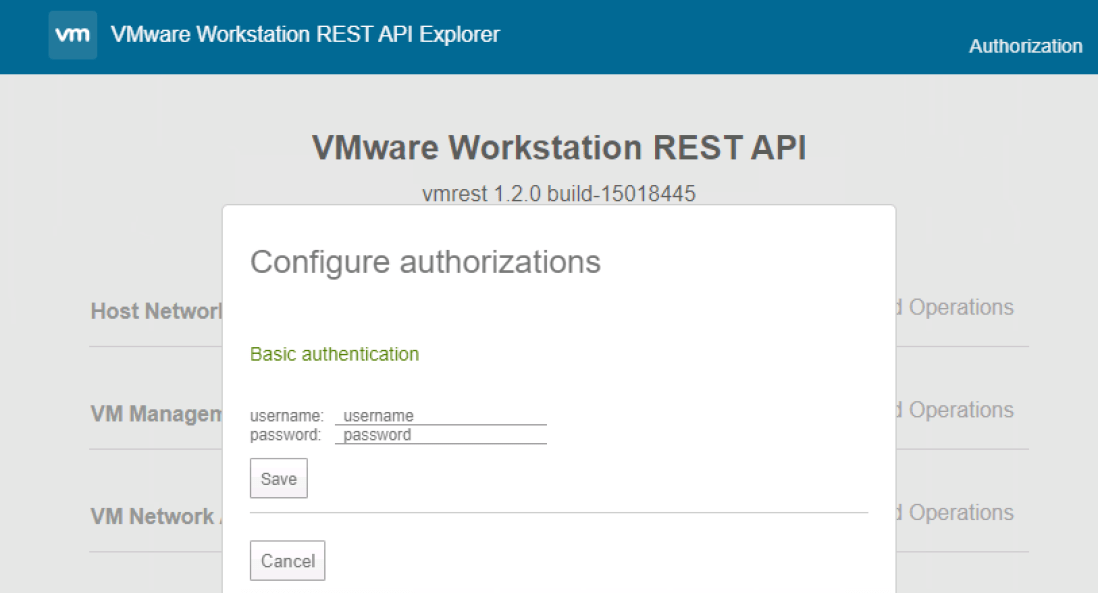
Then do a “Try it out!” on any GET method that doesn’t require variables and your Auth Code will appear in the Curl section in the “Authorization” header. Grab that code, you’ll use it going forward.

Here’s the script, with relatively obvious documentation. Since more than likely your SSL for the vmrest.exe API server will use a self-signed, untrusted certificate, you’re probably going to need to ignore any SSL errors that will occur. That’s what the “InsecureRequestWarning” stuff is all about, we disable the warnings. My understanding is that the disabled state is reset with every request made, so we need to re-disable it before every REST call.
I’ve posted this code on GitHub HERE.
#!/usr/bin/env python3
import requests
import urllib3
import sys
from urllib3.exceptions import InsecureRequestWarning

'''Variable Initiation'''

ip_addr = 'your-ip-or-hostname:Port' #change ip:port to what VMW REST API is showing
machine_list = ['k8s-master','k8s-worker1','k8s-worker2','k8s-worker3']
authCode = 'yourAuthCode'

'''Section to handle the script arg'''

acceptable_actions = ['on', 'off', 'shutdown', 'suspend', 'pause', 'unpause']

try:

    sys.argv[1]

except NameError:

        action = "on"

else:

    if sys.argv[1] in acceptable_actions:

        action = sys.argv[1]

    else:

        print("ERROR: Action must be: on, off, shutdown, suspend, pause, or unpause")

        exit()


'''Section to get the list of all VM's '''

urllib3.disable_warnings(category=InsecureRequestWarning)

resp = requests.get(url='https://' + ip_addr + '/api/vms', headers={'Accept': 'application/vnd.vmware.vmw.rest-v1+json', 'Authorization': 'Basic ' + authCode}, verify=False)

if resp.status_code != 200:

    #something fell down

    print("Status Code " + resp.status_code + ": Something bad happened")

result_json = resp.json()


'''Go through entire list and if the VM is in the machine_list, if so,
 act! '''

for todo_item in resp.json():

    current_id = todo_item['id']

    current_path = todo_item['path']

    for machine in machine_list:

        if current_path.find(machine) > -1:

        print(machine + ': ' + current_id)

        urllib3.disable_warnings(category=InsecureRequestWarning)

        current_url = 'https://' + ip_addr + '/api/vms/' + current_id + '/power'

        resp = requests.put(current_url, data=action, headers={'Content-Type': 'application/vnd.vmware.vmw.rest-v1+json', 'Accept': 'application/vnd.vmware.vmw.rest-v1+json', 'Authorization': 'Basic ' + authCode}, verify=False)

        print(resp.text)

        '''Better exception handling should be written here of course.

 In Search of the Perfect Data Management Machine